Wednesday, June 27, 2012
Wednesday, June 20, 2012
Monday, June 11, 2012
SPlus Direct Blog - Techno News, Tutorials and More
SPlus Direct's blog is a one stop solution for all your technical needs, keep yourself updated with latest news and reviews about laptops, desktops and other devices and gadgets. In addition, tips, guides and information on other stuff.
Tuesday, April 24, 2012
How to Change a Laptop Keyboard of a Dell Inspiron 1525
Laptop keyboards are one of
the significant parts, used for providing input to the system. We know that
keys of the keyboard, either of laptop or desktop, are easily breakable; hence,
its extensive use may lead one or more keys to pop out. This will require replacing
the keyboard with another one. Other than this, there could be several reasons
for its replacement. If you are a user of Dell laptop and you need to replace
your Dell Laptop Keyboard, than
here is a guide for you.
Here we have taken Dell
Inspiron 1525 and have defined each and every step involved in the replacement
of its keyboard. However, keyboard replacement procedure is somehow similar of
all models of Dell laptops.
The steps are easy to follow,
you don’t need to hire a technician to replace your laptop keyboard; you can do
it yourself. Moreover, when you decide to replace the keyboard of your Dell
laptop, you can opt to order a new one online as well. There are a number of
online stores that are dealing in Dell parts and claim to have a stock from
original manufacturer. Hence, replacing and repairing your Dell laptop parts
have become easier.
Read on to learn how to
replace a Laptop Keyboard of a Dell Inspiron
1525:
1. Remove Laptop Adapter
Turn off your laptop, unplug
the adapter if your laptop is on charge and remove the battery. You will find
the battery at the back of your laptop.
2. Remove the Battery
After removing the battery,
your next step is to remove two screws, which are in the battery section, basically
locking the keyboard bezel.
3. Unscrew your Laptop
Turn your laptop in such a
way that the keyboard is now facing you. Now with the help of screw driver,
lift the keyboard bezel from the right, cautiously. Once you have lifted it,
now keep on removing it by your fingers. But, you need to be careful, as there
is a thing ribbon cable, which is connecting button board to the motherboard. Remember,
it should not get disconnected from the motherboard.
After removing the bezel,
turn it over, with the cable connected. Now take out the screws, with the help
of the screw driver, which are holding the keyboard.
4. Remove Laptop Keyboard
Now you can lift the
keyboard. But, wait; the keyboard cannot be removed, as it is connected with a
flat ribbon cable to the motherboard. In order to do so, you will have to
unlock the connector and the cable will easily come out.
To unlock the connector, you
will have to lift the black plastic, which you can see on your Dell Inspiron
1525 and thus, the cable is free and you can remove your Dell Laptop Keyboard.
5. Replace your Laptop Keyboard
Now replace your damaged laptop
keyboard with the new one. Fix everything back in the same way, as you detached
and finally you are done with the replacement process.
Monday, April 23, 2012
How to Replace Your Dell Laptop Screen
Dell laptop parts are long
lasting only to a certain extent. Same is the case with Dell Laptop Screen, if your laptop falls down or you press its
display screen too hard, then for sure the screen will break. Improper cleaning
may also spoil the screen of your Dell Laptop, which commonly results in dark
spots and black spots.
It’s like a blessing that
just because of damage in laptop screen; you don’t need to replace the whole
laptop. What you have to do is get a
Philips screwdriver and a new Laptop Screen, which you can easily buy from a nearby store or through an online
store.
Read on, as here is an easy
to understand guide, which may assist you in the task of replacing your laptop screen:
1. Unplug the Laptop Adapter
First of all, turn off your
laptop, unplug the adapter, if plugged in a socket and disconnect all other
cables, if connected to your laptop.
2. Remove the Laptop Battery
Now turn your laptop, so that
you are able to remove the battery. All you have to do simply slide the latch,
the battery will be released and can be removed by lifting it upwards.
3. Remove Plastic Parts and
Seals
Now turn your laptop and
stretch open the laptop screen as much as possible. Around the frame of the Dell Laptop Screen, you will find screw
seals made of plastic as well as rubber. Remove the seals by using a sharp
object and then, with the help of Philips screwdriver, take out the screws
covered under them. Some of the Dell laptops have screw covers even on the
outer edges of the laptop lid.
4. Remove Display Cover
Now, gently start from one
side to detach the frame from the display cover. Remember, when separating, do
one side at a time. Like, first from the top and then from the bottom or vice
versa and now remove the screen bezel now.
5. Remove Laptop LCD Screen
You will find that the LCD
screen of your laptop is held with the help of screws, to the metal brackets on
the left and right side. Remove all those screws from both sides. now detach
your Dell Laptop Screen from the
display cover. On the palm rest of your laptop, place the laptop screen in
upside down position.
You can now see a green
ribbon cable, which is basically the video cable having two connectors. One
connector is joined with the LCD screen and another connector to the inverter
board. On both sides of LCD connector, you will see two latches, simply push
them and release the cable to disconnect it from the laptop screen. Now pull
the second connector up and separate it from the inverter board.
You are now able to remove
the laptop screen along with the inverter board. Inverter board is usually
attached with the screen, at the bottom. You can replace it separately.
6. Replace the Laptop Screen
You are now ready to replace your
damaged Dell Laptop Screen with the new one. Just follow the steps from bottom to top in
reverse order, fixing everything in the same manner as it was before and you
are done!
Thursday, April 19, 2012
How to Change Dell Laptop Batteries Specifically of Inspiron
All Dell Laptop Batteries are rechargeable, which for sure stops giving its performance, with the passage of time and use. As the time passes and extensive use, degrades the performance of the battery. Dell claims that for a general user, the battery becomes weak in a period of 18 to 24 months. One who uses comparatively 4 times more than general users, will find that the battery will stop performing before 18 months. Hence, it is recommend by Dell itself, to purchase a new battery for your Dell laptop, when it needs to be charged in an hour or less.
However, you will come across non Inspiron Laptop Batteries in market. The manufacturers claim that they are compatible with your Dell laptop, but actually there is no such case. Your battery should be of Dell, as they are the only ones appropriate for your Dell laptop. In addition, the original manufacturer provides technical support till the hardware warranty is not expired.
The process to change Dell Laptop Batteries is simple and it will require just few minutes. Here is a guide for you on how to change a Dell Inspiron Laptop battery.
First of all turn off your Dell Inspiron laptop to begin with the procedure of changing its battery.
Step 1:
Close the screen and turn your Dell laptop in such a way that the bottom side is in front. At the backside, on the bottom, you will find the battery. There will be a large plastic part, with joints around it, having signs that it can be removed. There you will see a latch, holding the battery, push and release it to slide the battery out of the system.
Step: 2
Now put the new battery at the same place in your Dell laptop. It is very easy to figure out the direction in which to connect the battery, as the receptor pins are only at one side of it.
Step: 3
Ensure that the battery is locked; if the latch does not go off back, than it’s unlock.
Gently, move the battery back and forth, so that the latch becomes flexible and locks the battery.
Gently, move the battery back and forth, so that the latch becomes flexible and locks the battery.
Step: 4
Now charge your new Dell laptop battery, by placing the adapter into a socket. Keep on checking the status on your system, on the right bottom of taskbar, which is shaped like a battery, in order to avoid over charging.
You are done with the steps involved in changing your Dell Inspiron Laptop batteries. Now take your laptop anywhere you want, after charging it, as the new battery is now ready to perform for maximum time.
Moreover, those having Dell laptops can also gain one of the best advantages offered. Basically, Dell has launched such laptops in the market, in which two batteries can be used and thus, this extends the existing run time of the battery, potentially. The second battery can be used in DVD/CD drive bay.
Wednesday, April 18, 2012
How to Choose the Right Dell Accessories for Dell Laptops and Desktops
Dell is undoubtedly, one of the top manufacturers of superior quality laptops and desktops, serving with its products all over the world. Dell makes its efforts to provide individuals, such systems, which may fulfill their requirements and demands, up to their expectations. Utilizing the best technologies and introducing further advanced technologies through their products, Dell has contributed in every field. Currently, now the large community, using Dell systems is offered Laptop Accessories as well. This helps users to enhance their systems or in other words, give it a modified dimension and more attractive look by plugging the most appropriate accessory.
Dell Desktop Accessories:
Whenever you buy a Dell Laptop or Desktop, you are not provided Dell Accessories along with them. If you are interested to get them for a better look of your system, you will need to buy them separately. When you buy your Dell Desktop, you will only get the basic software and hardware like CPU, monitor, hard drive, keyboard, mouse, supporting cables and operating systems as well.
Same is the case with Dell Laptops, however, mouse, keyboards, monitors are all built in, there is no CPU neither there are cables required, but only Adapters/Chargers are required, which are provided by the manufacturers. But, if you need to replace your laptop keyboard, add a separate mouse or anything else, you can easily do it.
If you possess either a Dell Laptop or Desktop, it is recommended that you shop for authentic Dell Accessories only. This is because; you may get support from the manufacturer in future, if there is any problem with the accessory; you have bought. Other than this, in most of the cases, the accessories from the manufacturer only, best fit your system.
Dell offers a number of perfectly designed and user friendly accessories for your Dell Laptops and Desktops:
Dell Desktop Accessories:
- Monitors:
Dell is famous for making the most excellent monitors and is also ranked number 1 in North America for bringing in new and highly advanced monitors, which provides great experience to its users. There are a series of monitor under the name of Dell, which are launched with extra features incorporated in them.
- Game Accessories
Game Accessories usually consists of keyboards, mice, headphones, graphic cards, game board, monitors and etc. that supports games and gives players an extra ordinary level of excitement in their gaming experience.
Rest of the Dell Accessories for Dell desktops includes Webcams, Graphic Cards, Keyboards and Mice, Speakers and Headphones.
Dell Laptop Accessories
- SWITCH Lids
For you Dell laptop, there are some cool and amazing Lids offered, to give your system a highly fascinating look.
- Bundles
Dell has a special offer called bundles, which basically includes two or more Dell Accessories, thus, offering customers to save some of their money.
In addition, Dell Laptop Accessories include laptop bags, keyboards and mice, docks and stands, speakers and headphones.
Hence, when you feel like accessorizing your Dell Laptop or Desktop, always shop for the right accessory. Today, getting any accessory for your Dell product is not a big deal, as all Dell Accessories are available in the market and obtainable online as well.
Tuesday, April 17, 2012
Alienware Laptop Parts – Order Online for Your Alienware Laptop
Since Alienware started to produce systems in the ever growing industry of technology, it has attracted most of the people through its attractively designed desktops and laptops. Alienware Laptops’ designs are a big source of attraction. Specifically, it has gained the attention of avid gamers. Playing games on Alienware Laptops gives you a great feeling, boosts your enthusiasm, and makes playing more entertaining and exciting.
Highly innovative models of Alienware Laptops, how could one stop from buying such a laptop, in order to get an extra ordinary thrill and pleasure in playing games. Therefore, by looking at its growing demand in the community of passionate gamers, online availability ofAlienware Laptop Parts has been considered.
In this era, when everything is away at a click of a mouse, when people try to find answers to all their questions on Internet, then how come businesses selling Laptop Parts stay behind? Now you don’t have to wander around from one shop to another, because now you may get the best parts at one place. You may place your order online and get the part for your Alienware Laptop at the step of your door.
The online stores or the websites are there to help you get quality parts for your Alienware Laptops. The main reason is that this product is more than a laptop and hence, to keep its performance consistently high is a must. However, Alienware has designed its laptops, using high speed processors, which supports games having extreme graphics. Thus, you don’t need to worry about the speed and performance.
When buying Alienware Laptop Parts, don’t get stuck up with the scams, always go for the reliable ones, providing original parts with warranty as well. You can judge that which sites are dependable, by checking out reviews available on Internet by satisfied customers, some online businesses are accredited by renowned accrediting bodies, which assures that they are authentic.
We are well aware that RAM is a major part, on the basis of which multiple tasks can be performed. Alienware Laptops always come with RAM, with a memory of 6GB. If you are interested to extend it, then you may upgrade it. You can easily obtain it from an online store.
One of the most significant Laptop Parts is video/graphic card. Today, as more and more advanced games are being developed, they require most excellent dedicated cards. However, Alienware Laptops come installed with one or more cards to give ultimate performance. But, many of the casual users, other than gamers, don’t need extra power.
You just name it and you will find all the parts for your Alienware Laptop Parts online. This initiative is just to provide convenience to all users. It is understood that extensive use of laptops, especially for playing games, may lead to failure of any significant part and hence, it’s on time repair or replacement is necessary. Getting the right part for your system is really challenging and hence, online stores are here to assist you in this regard.
Monday, April 16, 2012
Get Acer Desktop Parts Online at Wholesale Prices
Acer is a name in the world of technology, renowned for it’s out class series of Desktops. It has specifically designed Desktops for both consumer and business level, keeping in mind their needs. There is a large community worldwide, comprising of diverse people, who are users of Acer Desktops. There objective is to launch highly innovative, high speed and superior class Desktops, in order to stand ahead in the list of top notch desktop producers.
Hence, the great numbers of Acer’s Desktop users are always found searching for reliable and reasonably priced of parts. Undoubtedly, it’s a hectic task; therefore, to facilitate all such users, there are numerous online dealers and stores, offering the best parts, direct from the manufactures.
In addition, you may also find Desktop Parts, offered at wholesale prices on Internet. Nowadays, people are using the medium of Internet to find solutions for their problems. As a result, several websites have been launched, to make all parts in reach of everyone, at ease.
It is a matter of fact that desktops, at a fast pace get outdated and thus, it becomes difficult to find those parts at stores near you, which perfectly fits in your system. Therefore, people are opting for online shopping, as it gives them the feasibility as well as the benefit of buying parts at wholesale rates.
Moreover, buying your Acer Desktop Parts online from an authentic website; saves your money to some extent. This is because; some of the online stores are selling parts at wholesale prices. Other than this, your time is also saved, instead of roaming from one store to another for one or more parts; you are able to shop for all at one place.
Once you are on the way to replace, repair or add on something new in your Acer Desktop, all you want is to have the excellent quality Acer Desktop Parts at wholesale prices from the actual manufacturers. Be Alert! Besides, all the legitimate online stores, there are frauds, who have launched websites just to trap people with false claims of being bona fide.
However, Acer is a widely known company, that’s why you can easily get proper information and details about hardware on Internet. Take your time, conduct surveys and at the end decide upon one website, to shop for parts, for your Acer Desktop.
Whether its motherboard, hard drive, monitor, keyboard, mouse, cables, CD- DVD/RW, power supplies, RAM, sound card and etc. you will find all the necessary Desktop Parts online. Furthermore, today network cards are also available for Desktops. This card is required, if you are interested to use wireless networking on your Acer Desktop. It is not built in on your motherboard; you might need to buy it separately.
Graphic card is also an add on, which is required for playing high definition videos and for PC games. But, Acer parts might have them built in or you may need to buy them. No matter, which desktop part you need, you may get it at wholesale prices, via a reliable website.
Acer Laptop Parts – Get the Authentic Ones Online
In this technology driven era, the use of Laptops has increased to a great extent. Therefore, a large number of companies are making efforts, to come up with the best and easy to use Laptops. Acer is a well recognized name in this industry and there are numerous users of Acer Laptops worldwide.
Thus, if you have an Acer Laptop, then learning how to maintain and repair its parts, is really helpful. This is because, Internet is the most convenient medium to find Acer Laptop Parts and therefore, having proper knowledge about them, make help you in buying the right and authentic part online.
You can easily read about Laptop Parts on Internet as well as via other resources and acquire information about it. Moreover, on Internet you may find some several online stores and dealers that offer original and best parts of Acer Laptops. But, it’s really difficult to find the legitimate websites, which are selling reliable parts.
There are only few dealers online that have direct link with the company and hence, only such dealers can provide authentic parts. In order to know about websites that are among the few dealers of Laptop Parts, as discussed above, reading reviews from customers may help you choose the trusted one.
Once you are aware about the facts and working pattern of the website, then it won’t be difficult for you to get finest online retailer. In the end, it’s all about your Laptop, your work is affected or any other routine work, which you do using your Laptop. Getting your existing parts replaced or repaired with the best fitted ones is necessary.
Well, you can never guess which of section of your laptop will stop working or will get damaged, there is no exact timing defined. If your hard drive gets crashed, then you have no other choice except replacing it with the new one. There is a little or no possibility that you get your data back. Other than this, damaging of laptop adapters is the most common issue. Due to sudden power failure or voltage fluctuation, adapters stop functioning. Even if you are very much cautious, then also you can save your adapter from being damaged for a limited time period or to a certain level.
However, sooner or later, it is for sure you need to change, replace and repair your laptop parts, sometimes it’s just an extension and it is therefore, recommended choosing one of the genuine websites. There are many scams around on Internet, who claim to be trustworthy in selling the right parts.
It’s really very challenging to find online dealer of Acer Laptop Parts, when in huge quantity, people on Internet are waiting to cheat you. Obtaining the right, good quality and authentic parts for your Acer Laptop is necessary, as today most of our work is done using this highly innovative and high speed, human designed machines.
Monday, March 26, 2012
Read on to know How to replace your Laptop CPU or Laptop Processor of your Dell Vostro 1400. For this purpose, you will need to use some tools like one flathead and one flip screw driver. For your convenience, here is a tutorial defined in steps, in which you will come to know how various Dell parts, if needed, are removed and placed back.
To replace the Laptop CPU with the other one, you will need to first remove the battery, one of the significant Dell parts. At the backside of the laptop, push the two locks, one which is placed on the left upper corner and the other on the right upper corner, and slide the battery out.
Remove the Plastic Cover, which is one of the Laptop Parts, hiding the heat sink. This is done by removing the 3 screws, holding that piece of plastic, with the help of the flip screw driver.
Before you unlock your current Laptop Processor, your next step is to remove the heat sink, by unscrewing the 4 screws holding it, using the flip screw driver again. Now, you can easily lift the heat sink and keep it aside. For laptop CPU, a heat sink is one of the more likely laptop parts, which is used to dissipate the heat generated.
Now unlock your current Laptop Processor, by using the flathead screw driver. You will find a slot for a flathead screw driver, right at the top of the CPU socket or you can say at the upper left corner of the CPU. There you shall place the flathead screw driver and slightly turn it to left to remove the fixed laptop CPU. Once you are done with this, take the laptop processor out of the socket. Be careful while handling the laptop parts; make sure the pins are not bending.
After removing your existing Laptop Processor, take the new one. In order to install the new laptop CPU correctly, match the corners, as you can clearly judge, which could be the correct corner on the socket. The bottom right corner is needed to be placed accordingly.
Before you get a good view, you will tighten and lock the laptop CPU in its place. Fix it by using the flathead screw driver, turning it from left to right.
Your next step after placing the Laptop CPU to its right place will be to apply thermal paste. Simply, apply a pea size dot of thermal paste in the middle on the laptop processor. There are certain things in the laptop parts, which require special care. Therefore, this paste is applied, before the installation of heat sink, which helps to conduct heat more efficiently.
Now place the heat sink, back to its original position, after applying the thermal compound. To spread the paste easily, just press the heat sink in the middle. Fix the heat sink at its place by tightening its screws from one side to other diagonally.
 Now hide the heat sink by fixing the piece of plastic back to its place, place the 3 screws and tight them. You have successfully replaced your old laptop processor with the new one.
Thus, now with the help of this guide, you can easily replace and upgrade your laptop CPU and it’s compatible with other Dell Parts i.e. with multiple boards for Vostro 1400.
 Step 1: Remove laptop battery
To replace the Laptop CPU with the other one, you will need to first remove the battery, one of the significant Dell parts. At the backside of the laptop, push the two locks, one which is placed on the left upper corner and the other on the right upper corner, and slide the battery out.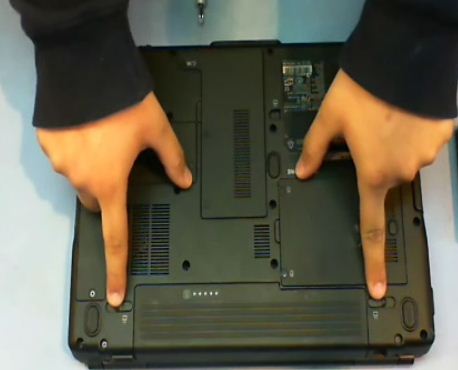
 Step 2: Remove plastic cover
Remove the Plastic Cover, which is one of the Laptop Parts, hiding the heat sink. This is done by removing the 3 screws, holding that piece of plastic, with the help of the flip screw driver.
 Step 3: Remove heat sink
Before you unlock your current Laptop Processor, your next step is to remove the heat sink, by unscrewing the 4 screws holding it, using the flip screw driver again. Now, you can easily lift the heat sink and keep it aside. For laptop CPU, a heat sink is one of the more likely laptop parts, which is used to dissipate the heat generated.
 Step 4: Unlock laptop processor
Now unlock your current Laptop Processor, by using the flathead screw driver. You will find a slot for a flathead screw driver, right at the top of the CPU socket or you can say at the upper left corner of the CPU. There you shall place the flathead screw driver and slightly turn it to left to remove the fixed laptop CPU. Once you are done with this, take the laptop processor out of the socket. Be careful while handling the laptop parts; make sure the pins are not bending.
 Step 5: Installing new processor
After removing your existing Laptop Processor, take the new one. In order to install the new laptop CPU correctly, match the corners, as you can clearly judge, which could be the correct corner on the socket. The bottom right corner is needed to be placed accordingly.
Before you get a good view, you will tighten and lock the laptop CPU in its place. Fix it by using the flathead screw driver, turning it from left to right.
 Step 6: Apply thermal paste to CPU
Your next step after placing the Laptop CPU to its right place will be to apply thermal paste. Simply, apply a pea size dot of thermal paste in the middle on the laptop processor. There are certain things in the laptop parts, which require special care. Therefore, this paste is applied, before the installation of heat sink, which helps to conduct heat more efficiently.
Now place the heat sink, back to its original position, after applying the thermal compound. To spread the paste easily, just press the heat sink in the middle. Fix the heat sink at its place by tightening its screws from one side to other diagonally.
 Step 7: Putting all back

 Now hide the heat sink by fixing the piece of plastic back to its place, place the 3 screws and tight them. You have successfully replaced your old laptop processor with the new one.
Thus, now with the help of this guide, you can easily replace and upgrade your laptop CPU and it’s compatible with other Dell Parts i.e. with multiple boards for Vostro 1400.
Video Guide :
here is a Video we have made for your quick understanding.Monday, March 5, 2012
5 Tips for Best Custom Made Dell Laptops
In this article I will give you 5 most helpful tips for purchasing Laptops or making custom laptops or upgrading you laptop and how to compare prices.
For buying or making best Custom made laptop, in the market there are singular variant brands and options when we to purchase a laptop or searching Laptop Parts for making custom laptop or upgrading exist laptop, this is truly great because you jazz many unlike choices, but it can also pretend the pick quite fighter.
Purchasing a laptop is discipline promotion resoluteness, as such it's not one that should be tolerating lightly, and there should be abundance of search done on your desired components before the inalterable select is made. This can be a difficult affect then we bonk compiled a lean of 5 key considerations before primary pick is what will the laptop be old for? Laptop standards for an alumnus and one for a web developer leave dissent greatly.
Here are some of most important Tips we have to consider:-
1. Laptop Processor
The intelligence of the laptop, Laptop Processor is by far the most key part of the laptop. The higher the processor travel, the quicker and author smoothly your computer runs. While a higher processor is enthusiastic to hump, one artifact to contemplate is the higher quicken, the higher the toll.
2. Laptop Memory
Laptop Memory also plays quite an influential enactment in laptop pace. Most laptops time soul DDR3 RAM. Since the stylish software programs and operating systems demand a lot of resources, for healthier show a minimum of 3GB of RAM is moldiness for your laptop.
3. Laptop Screen
Laptop Screen filler is a stellar thoughtfulness for a laptop get as fit. But this deciding again depends on the use of the computer. A graduate wouldn't status as voluminous of a strainer, but a graphics planner would be like opt for a large protect. Again, a key abstraction to name is the larger the covering, the larger the damage as compartment.
4. Connectivity – Wifi – LAN - USB
Connectivity options are also very heavy when purchasing a laptop. Most recent laptops loco mote with 4 ports, but they can go up to as umpteen as also, most today tender Wi-Fi, LAN, and USB, Bluetooth or separate connectivity choices all of which engage excellent connectivity.
5. Storage Drives
It is to be considering that what you are looking for in storage drives like Hard Drives capacity you need for business laptop, for personal laptop or for school laptop. You should be search for the different hard drives capacity of data with price comparison from shopping.com.
The above mentioned are righteous a few tips from my side according to my knowledge, here at SPlus, of bed supported on cause needs, there are polar things to muse. Play trustworthy, as ever, you do your explore and rattling see what it is that you are perception for.
The best or the most touristic laptop in the industry may not be the one to give your needs.
We would highly recommended one of the best sources for locating Laptop Parts especially Dell Laptop Parts for making custom laptops and Upgrading Laptop.
Thursday, February 16, 2012
Dell Laptop Parts, Accessories and other Laptop Parts with Free USA Shipping.
Greate News... SPlusDirect.com offering now Free USA Shipping for Buying Dell Laptop Parts, Accessories and other Laptop Parts.
We are glad to announced to you that we SPlusDirect.com now offering free Shipping to 48 States of USA for buying Dell Laptop Parts, Accessories, Dell Desktop Parts and all other Laptop Parts.
One more thing is very important for any Online Customer is that they need to buy Laptop Parts in very discounted prices. so we have done it for you and now you can get highest 10 percent discount on every purchase by entering this code "SPDWJ11".
SPlus will provides you with all the service and satisfaction you are looking for through this website. We have over 250,000 Dell Parts in stock. We offer both wholesale and retail services. If you don't see the part you're looking for in our website, please feel free to contact us for price & availability. All our parts come with 30 Days Warranty!!! on following products:
Laptop Parts Dell Accessories - Dell Laptop Parts - Dell Desktop Parts - HP Laptop Parts - Alienware Laptop Parts -Alienware Parts - Dell Parts - HP Parts - Dell Laptop Keyboards - Dell laptop Motherboards - Dell Laptop Battery - Dell Laptop Cables - Dell Laptop LCD
Laptop Parts Dell Accessories - Dell Laptop Parts - Dell Desktop Parts - HP Laptop Parts - Alienware Laptop Parts -Alienware Parts - Dell Parts - HP Parts - Dell Laptop Keyboards - Dell laptop Motherboards - Dell Laptop Battery - Dell Laptop Cables - Dell Laptop LCD
for further details please visit today www.splusdirect.com and www.splusstore.com
Issued By : SPlus Direct Phone : 1-214-988-9400 Fax : 1-214-988-9401 Address : 2951 N Great Southwest Parkway Suite Nol. 100 Zip : 75050 City/Town : Grand Prairie State/Province : Texas Country : United States Industry : Hardware
Monday, October 17, 2011
Dell Optiplex 320 Motherboard - Save 10%
Dell Optiplex 320 Motherboard
Part Number: MH651
Get 10% Off - Use Coupon Code SPDWJ11 during checkout, Enjoy Free Shipping within 48 contiguous states!
(Excludes Hawaii, Alaska & Puerto Rico)
Email: hmehdi@splustech.com
Web: www.splusdirect.com
Phone: 214-988-9400
Part Number: MH651
Get 10% Off - Use Coupon Code SPDWJ11 during checkout, Enjoy Free Shipping within 48 contiguous states!
(Excludes Hawaii, Alaska & Puerto Rico)
Email: hmehdi@splustech.com
Web: www.splusdirect.com
Phone: 214-988-9400
 |
| Dell Optiplex 320 Motherboard |
Tuesday, October 11, 2011
Dell Latitude XT Tablet PC Barebone - Buy Now
Get 10% Off - Use Coupon Code SPDWJ11 during checkout, Enjoy Free Shipping within 48 contiguous states!
(Excludes Hawaii, Alaska & Puerto Rico)
Email: hmehdi@splustech.com
Web: www.splusdirect.com
Phone: 214-988-9400

(Excludes Hawaii, Alaska & Puerto Rico)
Email: hmehdi@splustech.com
Web: www.splusdirect.com
Phone: 214-988-9400
10 Things to remember when buying Computer Parts Online
As with any major purchase online, buying a Computer Parts Online has benefits such as convenience; however, there are several things to keep in mind to make the purchase as hassle-free and smart as it can be.
Being experts in the field, we, here at SPlus have come up with several things for you to consider before making your online purchase. Keep in mind, that although the following are very important classifiers, your selection process should not be limited to these:

1. Generally speaking, the brand of a new computer really doesn’t determine much until user-specific desktop/notebook parts have been installed. So basically, you can start off with pretty much any machine.
2. You need to check the operating system to make sure that you are satisfied with what it has to offer. It’s always a good idea to play around with the operating system at an actual store before purchasing it online.
3. A third thing to bear in mind is the security of the information on the computer as well as the frequency of updates. Sensitive data needs to be protected via extra programs (which in turn, equates to extra installation on your end).
4. Next, you need to look for internet connectivity. Make sure the area where you’ll be using your computer, you have good internet coverage. Another thing to keep in mind is alternatives for surfing.
5. Make note of what software your computer comes with and what else you will need to purchase/download to fit your needs.
6. You need to do research and see what kind of applications and programs are available within each given marketplace. For example, Dell might offer different programs than HP.
7. You should also check out the entertainment programs that are available (because come on, we all know that your computer won’t just be used for work, you want to have some fun too!)
8. As a potential customer, you shouldn’t hesitate on asking the company representative (via phone or online) about security software, upgrading, tips to extend the quality-life of your machine, and any other queries which you may have.
9. Know when to expect system updates. As well as what kind of updates can be made available to you, and where you have to go to update (if it doesn’t automatically update).
10. Lastly, remember if you’re purchasing something online, you are not in direct contact with the dealer. Because of this, comparison shopping is extremely important. You should not only look at the software, prices, and quality, but also the sales approach. If you’re purchasing your product from a particular dealer, you need to make sure that they are readily available to answer your questions and address future concerns.
It is very important to know exactly what you want and be able to find it. The internet has a plethora of different products and after you have done your research, the selection process should be a lot more easier and efficient.
Dell Laptop Parts - How to select the Best accessories for your Dell Laptop?
Dell parts, dell laptop, computer parts, laptop parts, alienware parts,

Resources
Is your laptop getting kind of boring or perhaps it’s lacking something? Just the way we like to deck up to feel better about ourselves in front of the mirror; there are several products we can purchase to personalize and jazz up our dell laptops.
Basic computer functions include surfing the net, word processing, entertainment (gaming, watching movies, etc). But what sets your dell laptop apart from your classmates’ in Biology or you’re up-tight co-worker? Just like people, pets, and anything near and dear to us, computers should have personality as well! (As superficial as it sounds; but you’re in charge of what kind of “personality” your machine has!)
For starters, Dell offers the option of giving you different colored covers (pink, blue, red, so on and so forth). For many, this isn’t enough…so you can order personalized skins to put on your cover. I have seen a range of different types including pictures, themes, bands, whatever you want, you can readily order online. While we’re talking about screens and covers, I have also seen cover decals – for those of you who like a little bit more glitz and glam.
For the more practical’s out there, there are of course, the “usual” accessories such as: mouse, keyboard, and speakers. The most common kind right now are wireless with a USB, however; technology advances are introducing more and more savvy products to the general audience.
Another thing to consider is replacements. Although sometimes, it’s cheaper to buy a new system altogether, it’s wise to keep “spare” parts if you come across a good deal that you can’t pass up. The only thing to be cautious about in this scenario is that many times, you’ll end up paying a good buy for a knock-off (without knowing that it’s not original).
The surest way of not being fooled is to purchase replacements and essential products directly from the Dell site. The most common parts that Dell carries are: motherboard, keyboard, speakers, palm rest, LCD screen, LCD screen cover and bezel, ac adapters, DVD burner driver, and many other internal parts which the average Joe-Schmooze wouldn’t even know about. And as always, it’s important to follow instructions when installing certain parts (RAM, motherboard, etc).
The most resourceful and convenient place to look for any part is of course, your favorite search engine. However, before handing over your credit card numbers, make sure you have done enough research about the credibility of the company.
Websites like Amazon, Proctors, and eBay give ratings based off of customer satisfaction – this is a good indicator of how reliable the seller is. Remember, you will more than likely get some kind of warrantee/guarantee if you purchase from larger companies such as Dell. If you opt for the smaller/individual sellers, make sure you read the terms and conditions carefully.
Websites like Amazon, Proctors, and eBay give ratings based off of customer satisfaction – this is a good indicator of how reliable the seller is. Remember, you will more than likely get some kind of warrantee/guarantee if you purchase from larger companies such as Dell. If you opt for the smaller/individual sellers, make sure you read the terms and conditions carefully.
In conclusion, quality and price are two main factors to keep in mind while purchasing any product for your machine.
Resources
SplusDirect.com is a leading Online Parts Shop is USA providing huge range of Dell Laptop Patrs, Alienware Parts, Dell Parts with free Shipping in 48 US States.
Dell Laptop Parts – Where to locate latest dell parts exact your needs?
Before anyone can advise you on what kind of parts to look for, it is important to understand what you’ll be using your dell laptop for. Are you a casual Internet user or a heavy gamer? Think about what you’d like to use your computer for, will you be purchasing the latest games; will you be creating your own website using Flash? After taking all of this into consideration, realize that an investment like a computer should last a while, so think about your future needs.

If you like a dell laptop which is optimized for something such as video editing, or super enhanced graphics, and you won’t be using it for that purpose, you’ll be wasting money, don’t buy it! Instead opt to buy a “value” line computer. Value line computers are good for checking email, surfing the net, and word processing. Similarly, there are “enthusiast” line (computers which are good for power-use tasks) and “gaming” line computers which serve accordingly.
Before you start purchasing, it is crucial for you to know your laptops compatibility and whether or not one product will work better than others, or if the product you have your eyes set on, will work at all in your machine. To ensure complete satisfaction, you can refer to your dell laptop’s manual and see what kind of specs it has. Most of the time, it’ll have some sort of compatibility section as well. If it doesn’t, you can refer to their website and speak to a representative directly, or if you choose to do your own research, there is a plethora of pertinent information for each line of product which is sold.
There are several different places where you can purchase certain dell parts to meet your needs. Before going on your shopping spree, it’s important to compare and contrast different parts which may look very similar but serve different purposes or may have different capabilities. If the dell part you’re looking for is generic you can purchase it from any online computer store as well any physical computer store (granted that they have it in stock).
For more specific dell parts, you have to search a little bit more. The best place to look is always the manufacturer. You can go to their websites and see if they give the option of buying individual parts. Due to the uniqueness and function of a particular product, price can range widely (especially if you’re purchasing the product from the manufacturer).
A third place to look while purchasing is wholesale, auction, and consumer-driven sites (eBay, Amazon, etc). Sometimes, it is difficult to find products in the most obvious places. eBay is a great example of how someone’s trash can be your treasure. It may just so happen that person X is wanting to get rid of the very product you have been searching for. Since people who sell on eBay are generally not salesmen by profession, odds are that you can catch a pretty good deal. The secret lies in doing your research.
Resources
Resources
If you are looking for an Online Store of Dell Laptop and Dell Parts so I would like to recommend you www.splusdirect.com which is the best Computer Parts Seller in USA.
Alienware Laptop Parts – 5 Tips to Upgrade your Laptop Configuration.
If your laptop is getting slow and you feel like you need to upgrade its’ configuration, there are a few things which you need to consider. Since we’re living in an age of laptops and high technology, we can presume that we don’t need to get messy with upgrading desktops. However, some of the following upgrades can easily be performed on desktops as well as laptops.
First thing, you need to lift up the lid on your laptop and see what all you’re working with. In a few easy steps, we’ll tell you how you can enhance your tired old laptop. However, you must beware, a lot of times, laptop manufacturers; install parts which cannot be removed, which prevent the machine from being upgraded. Having a laptop with removable Alienware Laptop Parts, is infinitely upgradable.
Resources
SplusDirect.com offering superb and brand new Alienware Parts range including Alienware Laptop Parts and NoteBook Parts with free Shipping at 48 US States.
First thing, you need to lift up the lid on your laptop and see what all you’re working with. In a few easy steps, we’ll tell you how you can enhance your tired old laptop. However, you must beware, a lot of times, laptop manufacturers; install parts which cannot be removed, which prevent the machine from being upgraded. Having a laptop with removable Alienware Laptop Parts, is infinitely upgradable.
 |
| Images Source FinalSense.com |
1. The first thing to do when upgrading is tweaking software. By doing so, you have the option to add memory which in turn increases performance (as the original installation option can be less than par).
2. There are a few things like graphic cards, video cards, and memory that you can purchase and install, but in some cases, it may be more wise to purchase a new laptop altogether. These upgrades are sometimes costly and purchasing a new laptop is relatively cheap now.
3. You will also need a list of processors based on the same socket, same voltage, and within the same thermal range of power. This information is important because it’ll prevent you from shutting your machine down.
4. The battery is also something which you can easily replace by removing the original one and inserting a new one. A lot of times, the battery life deteriorates and a by installing a new battery, you can add more power and life to your machine. Make sure your machine is powered off at this time, as well as unplugged.
5. Lastly, another thing you can add to jazz up your laptops’ configuration is speakers. Speakers are very accessible in any electronics store. As with any other product, it is important to do your research and of course, compare and contrast your final selection with other equally reputable options. Most speakers can easily be plugged in to your machine with a simple chord but there are others which require intricate installation.
When purchasing, it is important to keep in mind what you will be using these speakers for. Will your machine turn into a full entertainment system for big parties or will it be used moderately for your entertainment?
These are a few of the things we think you can do to upgrade your systems configuration and capabilities. The most important things to bear in mind are installation process and cost. You do not want to pick up a project that you can’t finish without pulling your hair out, nor do you want to make grand purchases without thinking the pros and cons out thoroughly. When purchasing, it is important to keep in mind what you will be using these speakers for. Will your machine turn into a full entertainment system for big parties or will it be used moderately for your entertainment?
Resources
SplusDirect.com offering superb and brand new Alienware Parts range including Alienware Laptop Parts and NoteBook Parts with free Shipping at 48 US States.
Dell Inspiron 1501 - Count the Days of Success
Free in posthumous 2006, the Dell Inspiration 1501 is among Dell's mainstream models. It belongs to specified aggregation mainly because of its consumer intimate price. Tho' it has been roughly quaternion age, this help is comfort common since the computer parts and specifications are on the higher end.
The Processor Find
The Dell Inspiration 1501 is Dell's rattling early modelling to use only AMD as its processor. All its predecessors utilized Intel, hence swing the 1501 on brainstorm. This helper can run using AMD Turion, AMD Athlon 64 X2, or AMD Sempron processor. These processor options change shifted group's tending from solely Intel computers to AMD.
Parts and Features
Dell Inspiron 1501 has 15.4 inches widescreen situation, which belongs to the mid-size family. Its widescreen have enables users to set the screen breakdown up to 1280 × 800. Its retentiveness starts from 512 megabytes and can be distended up to 2 gigabytes DDR2. The stiff disk area is 60 gigabytes and can also be distended to 320 gigabytes.
 |
| Image Source bidorbuy |
The Processor Find
The Dell Inspiration 1501 is Dell's rattling early modelling to use only AMD as its processor. All its predecessors utilized Intel, hence swing the 1501 on brainstorm. This helper can run using AMD Turion, AMD Athlon 64 X2, or AMD Sempron processor. These processor options change shifted group's tending from solely Intel computers to AMD.
Parts and Features
Dell Inspiron 1501 has 15.4 inches widescreen situation, which belongs to the mid-size family. Its widescreen have enables users to set the screen breakdown up to 1280 × 800. Its retentiveness starts from 512 megabytes and can be distended up to 2 gigabytes DDR2. The stiff disk area is 60 gigabytes and can also be distended to 320 gigabytes.
The graphics processor and chipset is an Unified ATI Radeon Xpress 1150. With these machine parts and specifications, the 1501 can be misused for recreation, but exclusive modest to games in 2006 which expect fewer specifications. Nonetheless, with a graphics processor such as the Radeon Xpress, and the widescreen article, the 1501 is eligible to run sound and rigorous graphics.
Different features include DVD-reader and CD illustrator, 802.11 mini cardboard for Wi-Fi, 6 radiotelephone battery (can be dilated up to 12 cadre), and input/output devices specified as 4 USB ports, 1 56k modem, 1 blistering Ethernet port, 3 in 1 remembering scorecard customer, verbalize paper receptacle, and the usual VGA yield, headphone run, microphone jackass and state musician opening.
The Attendance
The Dell Inspiron 1501 looks polish in medal, colour and negro emblazon, enabling it to veer away from the unelaborate hunt laptops. The corners are curvy which adds to its examination attendance. The cover lock and the backwards of the take are plastic but are ease rugged and temperate. Nonnegative,
The Cost
The starting terms of the 1501 is $549, which is pretty low for its features. This affordable assistant enabled numerous users to purchase it. It is among Dell's low priced units which unsealed doors to the more consumer warm mart.
Overall, since conception in laptop models are rapid, and the Dell Inspiron 1501 may safe obsolete, its computer parts, features and specifications say the otherwise. With its low soprano and near specifications it was among the most favorite models of its period. Its power for element elaboration implies its versatility to every soul's demands.
Different features include DVD-reader and CD illustrator, 802.11 mini cardboard for Wi-Fi, 6 radiotelephone battery (can be dilated up to 12 cadre), and input/output devices specified as 4 USB ports, 1 56k modem, 1 blistering Ethernet port, 3 in 1 remembering scorecard customer, verbalize paper receptacle, and the usual VGA yield, headphone run, microphone jackass and state musician opening.
The Attendance
The Dell Inspiron 1501 looks polish in medal, colour and negro emblazon, enabling it to veer away from the unelaborate hunt laptops. The corners are curvy which adds to its examination attendance. The cover lock and the backwards of the take are plastic but are ease rugged and temperate. Nonnegative,
The Cost
The starting terms of the 1501 is $549, which is pretty low for its features. This affordable assistant enabled numerous users to purchase it. It is among Dell's low priced units which unsealed doors to the more consumer warm mart.
Overall, since conception in laptop models are rapid, and the Dell Inspiron 1501 may safe obsolete, its computer parts, features and specifications say the otherwise. With its low soprano and near specifications it was among the most favorite models of its period. Its power for element elaboration implies its versatility to every soul's demands.
Resources
See Complete range of Dell Parts and Dell Laptop at one of the best Online Dealer of huge range of Computer Parts selling Worldwide.
See Complete range of Dell Parts and Dell Laptop at one of the best Online Dealer of huge range of Computer Parts selling Worldwide.
Subscribe to:
Posts (Atom)